
By the end of this you will know what ChatGPT and Claude actually do with a fillable PDF, where they slip on an ACORD form, and a workflow that keeps a guessed FEIN out of your submission.
You have a blank ACORD 125. A client email with half the answers. Last year's dec page.
You drag the PDF into ChatGPT and type fill this out.
What comes back?
Usually something that looks finished. That is the problem. A form that looks finished and a form that is right are two very different things when a carrier clears on the FEIN and an underwriter reads every checkbox.
Can ChatGPT fill out PDF forms?
Sometimes, and partly. It reads PDFs well. Writing values back into the form depends on the plan, the tools turned on, and whether the PDF has real form fields at all.
Here is what each of the big two can do as of late 2026:
- ChatGPT reads files you attach and can work on them with code. OpenAI keeps the current limits in its file uploads FAQ. Its agent mode works on its own virtual computer and can fill out online forms.
- Claude reads PDFs and can create and edit files, PDFs included. Anthropic's help article on creating and editing files covers which plans have it.
In practice you get one of three results:
| What you ask | What usually comes back | Good for |
|---|---|---|
| "Fill out this form" | A list of fields and values in the chat | A draft you check |
| "Write the values into the PDF and give me the file" | A new PDF, made by code the model ran | Fillable forms with real fields |
| Agent mode on a web form or portal | The model types into the page itself | Watching closely, one field at a time |
The first result is the most useful one. Strange, right? The chat list is where you can see every guess.
Where it slips on an ACORD form
ACORD forms are dense, and they punish small errors. These are the spots where a model goes wrong.
Flattened or scanned PDFs. A carrier supplemental that was printed and scanned has no fields. The model can describe it, or lay text on top of it, but there is nothing to fill. Ask it to fill one and you may get a file that looks filled and is just a picture with words pasted over it.
Field names that don't match the labels. Inside a fillable PDF every box has an internal name, and it rarely reads like the label you see on the page. A model mapping values by name can drop the mailing address into the location address. Thunk. Wrong box, right-looking form.
Checkboxes and yes/no questions. The general information questions on the 125 are a column of Y/N boxes. Models skip them, flip them, or answer them from nothing. Each one is a statement your client makes to the carrier.
Repeating rows. Locations, vehicles, prior carriers, losses. Models merge rows, drop the fourth location, or stop at the first page of a schedule.
The invented value. This is the big one. Ask for a FEIN it was never given and you may get nine plausible digits. Same with years in business, effective dates, square footage. A made-up FEIN doesn't look made up. Our ACORD 125 guide explains why carriers clear on that number, and why a blank one is better than a wrong one.
One more thing before you build a workflow on it: ACORD forms are licensed. Check that your agency's use is covered, starting with ACORD's own forms FAQ.
A workflow that keeps you safe
Flip the order. Don't hand it the blank form first. Hand it the facts first.
- Use a business plan with training off. Client data does not belong in a personal chat. Our guide on whether ChatGPT is safe for client data walks through the plans and settings.
- Give it the sources. Prior application, dec page, the client's email, the loss runs. Name each file clearly.
- Ask for a field list, with a source for every value. No source, no value.
- Read the gap list. Those are your questions for the client. Send them.
- Only then fill the form, from the checked list, by the model, by your agency management system, or by hand.
- Open the finished PDF and check every field against the list. Checkboxes too. Rows too.
- A licensed person signs off before it goes to a carrier.
Seven steps sounds slow. It's faster than a bounced submission and a second round of questions to your client.
The prompts that stop the guessing
The first prompt pulls facts out. The second one checks the finished form.
You are helping an insurance agency prepare an ACORD 125 draft.
Sources attached: [PRIOR APPLICATION], [DEC PAGE], [CLIENT EMAIL].

Make a table with these columns: Field, Value, Source file, Page.
Rules:
- Only use values that appear in the sources. Quote them exactly.
- If a value is missing or unclear, write NOT FOUND. Do not guess.
- Never make up a FEIN, date, address, or dollar amount.
- List every repeating row (locations, prior carriers, losses) separately.
After the table, list every NOT FOUND field as a question for the client.
Compare the attached filled PDF to the field table above.
List every field where the PDF differs from the table, every checkbox
that is answered in the PDF but has no source, and every field the
PDF left blank. Do not fix anything. Just list it.
Notice what both prompts do. They make the model show its work, and they make not knowing an allowed answer.
Which forms is it good at?
Some forms are friendlier than others.
| Form | How AI does | Watch for |
|---|---|---|
| ACORD 25 certificate | Risky | Every line has to match the policy. See how to fill out ACORD 25 |
| ACORD 125 application | Good draft | FEIN, the Y/N questions, prior carriers |
| ACORD 126 general liability | Fair | Class codes and exposure bases need a person |
| ACORD 140 property | Good at pulling building data | Values and construction details. See how to fill out ACORD 140 |
| Carrier supplementals | Weak | Often flattened, no fields |
The pattern? AI is strongest where the answer already exists in a document, and weakest where the answer is a judgment.
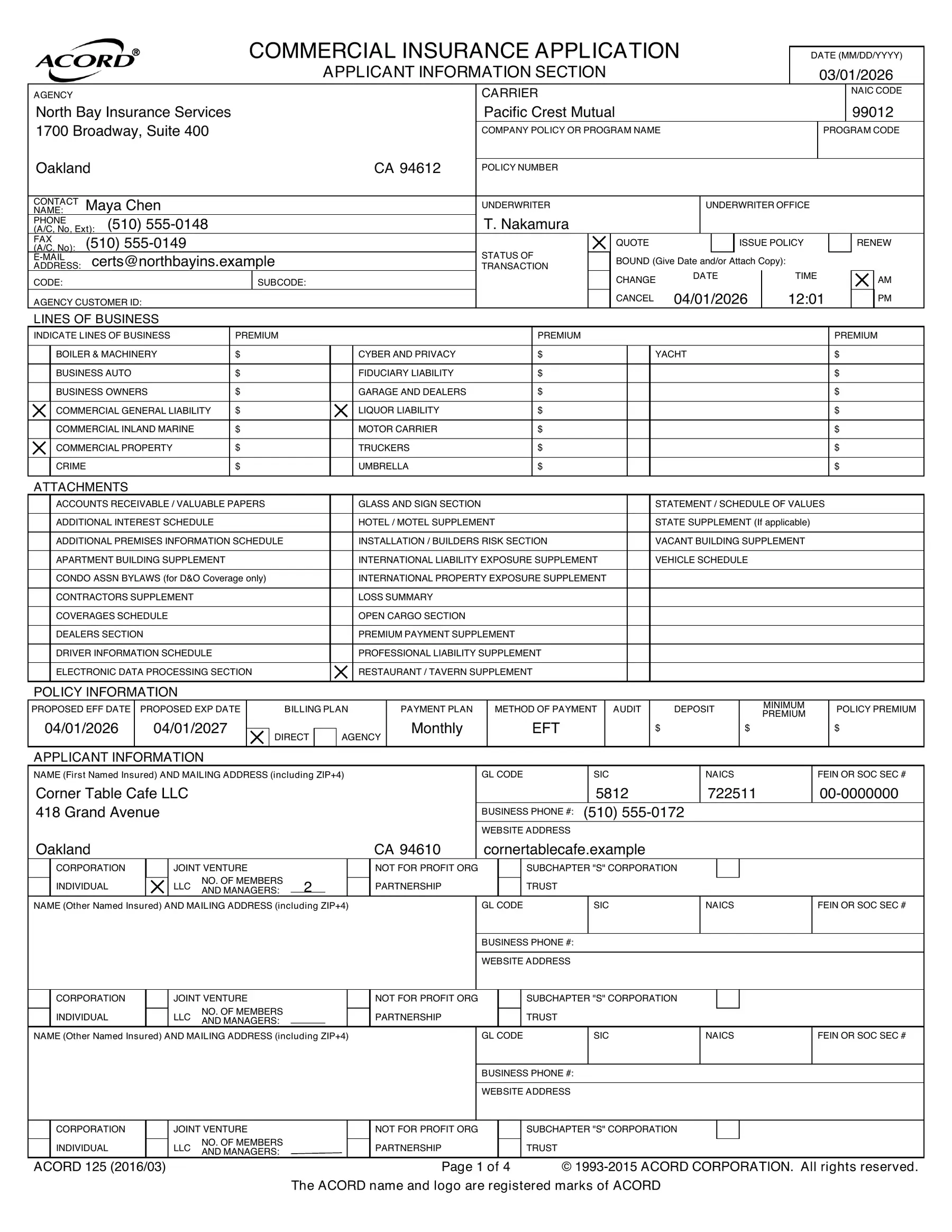
A finished ACORD 125 for a fictional cafe. Every value traces back to a source document.
When to hand it off instead
If you'd rather approve a finished application than babysit a chatbot, that's what Salience does for agencies. You forward the request and the prior application. Salience prepares the ACORD forms, flags what's missing, and nothing goes to a carrier until you approve it.
For more jobs like this one, browse AI by task.
Give us a call
Hey, all the tech is great, and innovation is great. There's a lot of responsibility and liability across the entire space, and a lot of people are saying the same words that mean different things. Give us a call. We plug in specifically to your processes and take care of the GDS first to unlock you and bring home the bacon.
Call +1 (916) 866-7867 or book a walkthrough.
Would you rather approve this than type it?
Forward the request or the prior application. Salience prepares the form, flags what's missing, and nothing goes out until you approve it.
Frequently asked questions
Can ChatGPT fill out PDF forms?
Sometimes. It reads a PDF well, and with its file and agent tools it can write values into a fillable PDF, but it can also put a value in the wrong box or make one up. Treat what it gives you as a draft a person checks field by field.
Is there an AI that can fill out PDF forms?
Yes. ChatGPT and Claude can both draft the answers and, with their file tools, write them into a form that has real fields. For insurance forms the question that matters is who checks the result before it reaches a carrier.
Can ChatGPT fill out forms for me?
It can draft answers from documents you give it. Left alone it will also fill gaps with plausible guesses, so tell it to leave unknown fields blank and list them instead.
How do I use AI to fill out forms without mistakes?
Give it the source documents first, ask for a field list that names the source of every value, make it mark gaps instead of guessing, and check each value against the source before anything is signed or sent.
Can AI fill out an ACORD 125?
It can draft one from a prior application, a dec page and client emails. Expect trouble with checkboxes, repeating rows like locations and prior carriers, and the FEIN, which it may invent. Check those by hand.